
Pull from Onshape
Bring Onshape changes into the staged BOM. Clear changes apply on their own; the rest wait for your decision.
Pull
Choose Pull on a row in the MCAD list, or on the Onshape card in a BOM item's Engineering › Mechanical tab.
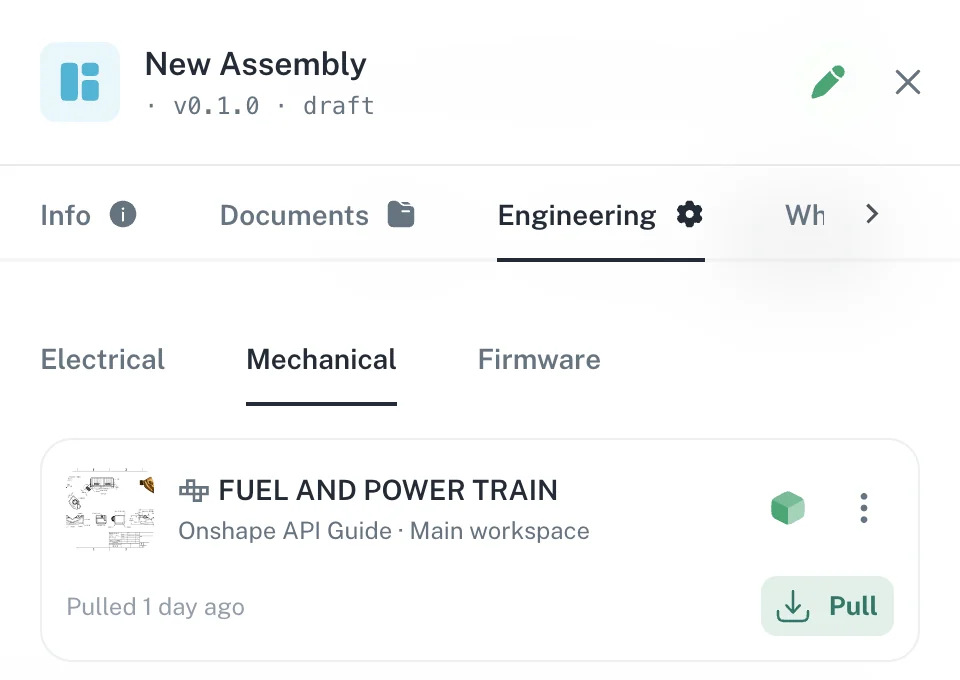
Pull changes only the staged BOM. If nothing changed, Partix says so. Otherwise the review opens.
Applied automatically
| Change | Label |
|---|---|
| Quantity changed in Onshape only | Quantity |
| Sub-assembly, or part matching a CPN, added in Onshape | Added |
Changes made only in Partix are kept.
Needs review
| Label | When | Choices |
|---|---|---|
| Conflict | Quantity changed in both | Use Onshape, Keep Partix |
| New part | Part matches nothing in Partix | Create new part, Use existing part, Leave out |
| Removed | Line is gone from Onshape | Keep in BOM, Remove from BOM |
| Revision | Revisions differ | Keep Partix, Use Partix (rev) |
Decide every item, then choose Apply. If any item creates a part, pick a numbering subcategory first.
Later closes the review unapplied. The link shows N to review until you finish, and can't be pulled again until then.
Parts you Leave out and lines you delete in Partix stay out on later pulls.
Revision
Partix never takes a revision from Onshape. Keep Partix leaves the line as it is; Use Partix (rev) moves it to the Partix revision with Onshape's label, where one exists. A kept difference isn't raised again until Onshape's revision changes.
After applying
Choose Open staged BOM to check the result, then commit as usual.