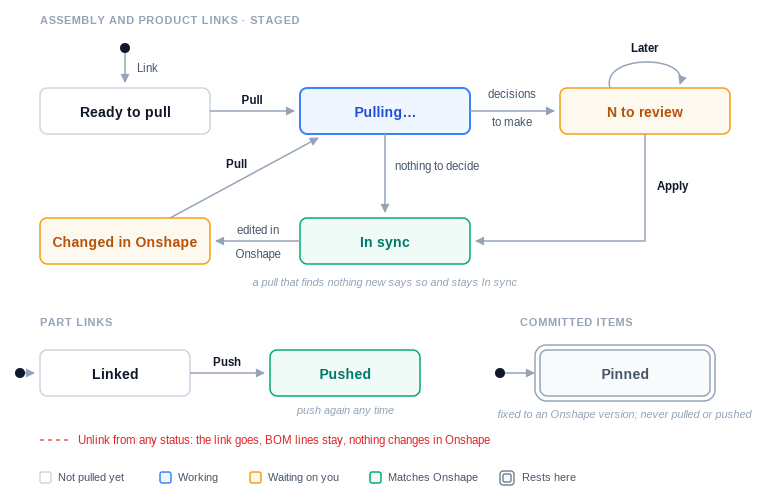
Every status a link can have and what moves it on: the pull cycle for staged assemblies and products, Linked and Pushed for parts, and Pinned for committed items.
Status
Meaning
Next step
Ready to pull
Never pulled
Pull
Pulling…
Pull running
Wait
In sync
Matches the last pull
—
Changed in Onshape
Onshape changed since the last pull
Pull
N to review
Pull waiting on decisions
Review
Linked
Part link, not pushed yet
Push
Pushed
Part link, pushed
—
Pinned
Committed item fixed to an Onshape version
—
Area
Area
Meaning
Staged
Linked to the staged draft
Committed
Linked to the latest committed revision
A version label
Pinned to that version
Where the item sits
Shown
Meaning
Product · root
The product itself
Assembly · inparent
The path above it
not in a BOM yet
Not placed in any BOM
Items not in a product yet are grouped under Not in a product.