
How a work order moves
A work order moves from draft through approval and production to completion and closing. The available actions depend on its current status.
Each status change is recorded in the order's history, along with who made it.
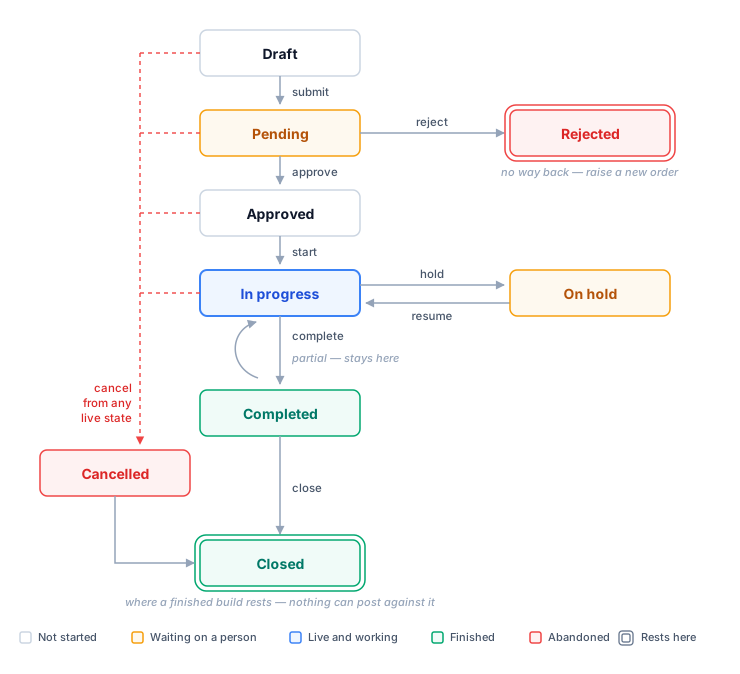
The states
| State | What it means |
|---|---|
| Draft | Being written. Nothing has been asked of anyone yet |
| Pending | Submitted, waiting on an approver |
| Approved | Cleared to run, not started |
| Rejected | An approver turned it down, with a reason. Final — see below |
| In progress | Being built |
| On hold | Paused, with a reason. Keeps its material |
| Completed | Production is finished |
| Cancelled | Abandoned. Reserved material was given back |
| Closed | Costs are final. No further changes can be recorded |
Available actions
| Move | Allowed from | What else it does |
|---|---|---|
| Submit | Draft | Refuses an order with no steps |
| Approve | Pending | Allows the order to be started |
| Reject | Pending | Requires a reason |
| Start | Approved | Opens the first step for work |
| Hold | In progress | Requires a reason. Keeps its reservation |
| Resume | On hold | Clears the hold; the history keeps why |
| Cancel | Any live state | Requires a reason. Releases every reservation |
| Close | Completed, Cancelled | Ends all posting |
Where a build ends up
Two states are final. They are drawn with a double outline above, and they are the only two where a work order accepts no further moves.
| Final state | How a build gets there | What it means |
|---|---|---|
| Closed | Completed → close, or Cancelled → close | The normal end. The build is settled and nothing can post against it |
| Rejected | An approver turned it down | The order cannot be edited, resubmitted, cancelled or closed |
Everything else still has somewhere to go. Completed and Cancelled both look like endings but are not — each still has to be closed, which is the step that actually ends the accounting.
Rejected cannot be recovered
There is no path out of Rejected — not even cancel or close. Its action bar is empty. If a rejected build still needs to happen, raise a new work order; the rejected one stays as the record of the decision.
Available buttons
The action bar shows the actions available for the order's current status.
If a button you expected is missing
The action is unavailable for the current status. The most common case is trying to hold an order that has not been started — hold applies to work in progress, and an approved order has not begun.
Holding keeps material, cancelling gives it back
- Hold keeps stock reserved for the build.
- Cancel releases reserved stock for other builds. Material already issued stays issued.
Every move is recorded
Each transition writes a history entry: what moved, who moved it, when, and the reason if one was required. The History tab on the work order shows the full sequence.
History is not the message stream
The comment thread on a work order is a conversation, and people can delete from it. The history is a record and cannot be edited. Do not rely on comments to explain why something happened — use the reason on the move itself.