
What a work order is
A work order is the record of one build: what you are making, how many, what it takes, who is doing it, and how many units were produced.
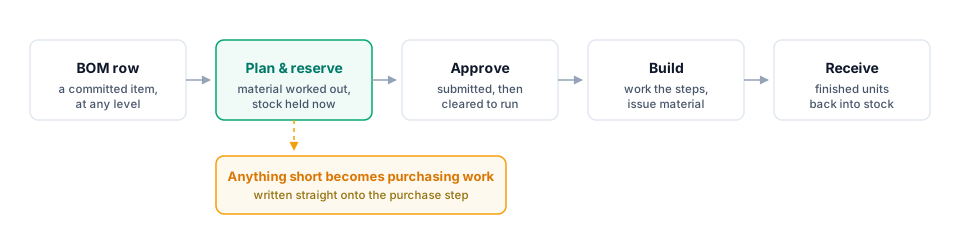
You raise one against a released BOM. Partix works out the material from the structure itself, reserves what it can from stock, and turns whatever is short into purchasing work. From there the order moves through a fixed set of states — submitted, approved, started, finished — and every move is recorded.
Use this for
- Building a product or an assembly, at any level of the BOM.
- Knowing what a build will consume before you commit to it.
- Tracking a build in progress, and seeing which of several is stuck.
- Costing finished units on what was actually consumed, not what was estimated.
Build from a committed revision
A work order always targets a committed revision. A draft has no part number, so finished units would have nothing to be received into.
This is also why you can build at any level. A subassembly deep in a product's structure is a released item in its own right, so "build just this bracket" is a work order like any other — you raise it from the bracket's row rather than the product's.
Material is calculated from the BOM
When you raise the order, Partix walks the BOM from the item you chose and works out the demand for the quantity you asked for. You are not typing a parts list, and you cannot add a part the structure does not call for — though you can mark extras as unplanned once the build is running.
Existing assembly stock is included in the plan:
Use assemblies already in stock
If a build needs four gearboxes and you have three on the shelf, Partix pulls those three and adds the parts needed to build the fourth.
Stock is reserved as soon as the order exists
The moment a work order is created, Partix holds the stock it needs — oldest lot first — and records how much it actually got.
Reserved stock is held for this order and cannot be reserved by another build.
Whatever the reservation could not cover is a genuine shortage, so Partix writes it straight onto the order's purchase step instead of reporting a number you have to act on yourself. See When material is short.
What the record holds
| Steps | The operations to work through, in order, each with its own material |
| Material | Every part the build needs, what is reserved, and what has been issued |
| Receipts | Finished units, received in batches as they are made |
| History | Every state change, who made it and why |
| Documents | Drawings, instructions and anything else attached to the build |
Where to go next
- Key concepts — the words this section uses, and what they mean here.
- Raise a work order — starting one from a BOM row.
- How a work order moves — the states and who can move between them.